
Photo to Coloring Page vs. Line Drawing: Key Differences
Updated 2026-08-14 · 6 min read
Tested using the same family photo in both Love to Color workflows.
Both tools turn a photo into an outline, but they optimize for different next steps. A coloring page uses simpler shapes, stronger boundaries and larger enclosed spaces for printing and coloring. A line drawing keeps more contours and fine details for tracing, crafts and visual reference. Choose by what you want to do after download.
Choose by what you want to do next
Choose a Coloring Page
You want larger enclosed spaces, clearer boundaries and a page that is easy to fill with crayons, pencils or markers.
Make a coloring page →Choose a Line Drawing
You want more contours and fine detail to use as a tracing reference, craft template or clean black-and-white artwork.
Make a line drawing →Same photo, three results
The quickest way to see the difference is to hold the source constant. This family photo was tested in both Love to Color workflows so the change in detail and usable coloring space is easy to inspect.

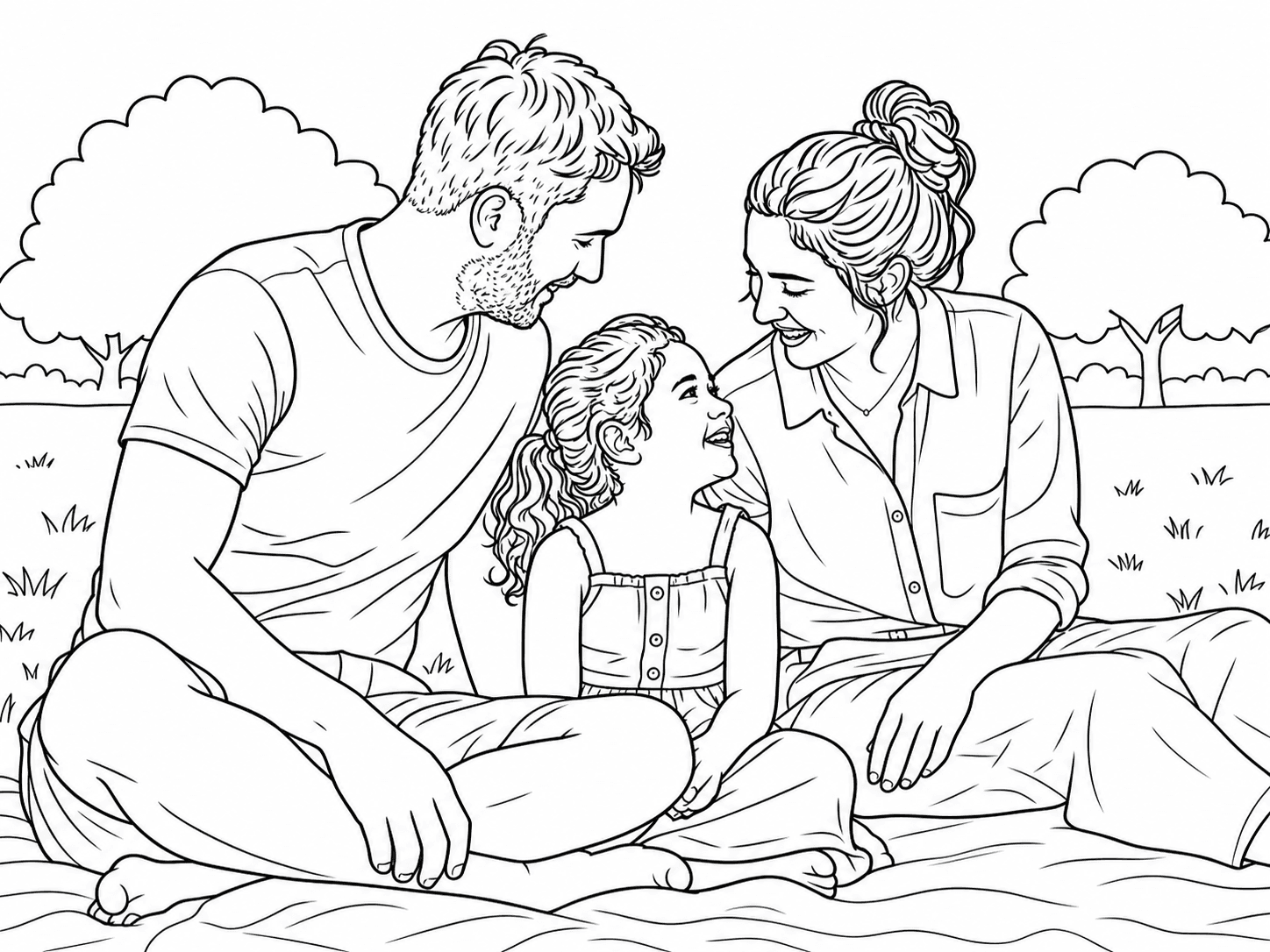
Coloring page: larger enclosed spaces, fewer details, easier to color. Line drawing: more contours, finer details, better for tracing and crafts.
Key differences at a glance
| Comparison | Photo to Coloring Page | Photo to Line Drawing |
|---|---|---|
| Main purpose | Easy, printable coloring | Detailed artistic outline |
| Detail level | Low to medium | Medium to high |
| Coloring spaces | Large and enclosed | Smaller or sometimes open |
| Line style | Clear, bold and simplified | Fine, delicate and detailed |
| Best for | Kids, classrooms, gifts and coloring books | Crafts, tracing, portraits and design references |
| Printing | Designed for printing and coloring | Printable, but not always easy to color |
| Choose it when | You want to add color afterward | You want to preserve more of the original photo |
What makes a photo coloring page easier to use
A photo coloring page is not just a photo with the color removed. It simplifies the scene into a small set of readable shapes, with linework that tells the eye where one area ends and the next begins. The goal is a page that still feels recognizable but does not make the colorist decode every tiny texture.
That usually means larger enclosed regions, a calmer background and a consistent line weight. Faces, hands, paws and important objects should remain recognizable, while grass, fabric texture and background clutter can be reduced. For younger children, the same principles matter even more because small or open regions quickly become frustrating to fill.
Create a printable coloring page from a photo · Choose a better source photo · Match complexity to a child's age
What makes a photo line drawing more detailed
A photo line drawing treats the outline itself as the finished visual. It can preserve more contours in hair, clothing, furniture, plants or architecture, even when those details create smaller regions or lines that do not fully enclose an area. That makes it useful as a tracing reference, craft template, portrait study or clean black-and-white artwork.
More detail is not automatically better. If the next step is coloring, inspect the smallest regions and the lightest lines before choosing this result. Fine contours can look excellent on screen but disappear at home-printer scale or create too many decisions for a young colorist.
When more detail is worth keeping
Extra contours are useful when the drawing itself is part of the project. They can preserve the character of a portrait, the shape of a pet's fur, the structure of a room or the details that make a travel photo recognizable. In those cases, the line drawing is closer to a reference or craft template than to a page designed for broad areas of color.
Choose this direction when you expect to trace, transfer, edit or study the outlines. If you plan to color the page instead, return to the simpler option when the extra detail stops helping the person who will use it.
Choose by the finished use case
The best choice becomes clearer when you name the finished activity rather than the visual style. Both workflows can produce attractive black-and-white images, but the practical requirements change depending on what happens after download.
- For children and classrooms: choose a coloring page with larger regions, stronger boundaries and a simpler background.
- For a printable family or pet activity: choose a coloring page when recognition and printability matter more than sketch texture.
- For tracing or crafts: choose a line drawing when you want a clean contour reference and plan to work by hand.
- For portraits or decorative line art: choose a line drawing when preserving more facial, clothing or scene contours is part of the result.
- For a multi-page coloring book: start with coloring-page outputs, review each page, then arrange the PNGs with a cover and margins in a separate layout workflow.
Learn how individual pages become a coloring book · Prepare the final pages for printing
Test both with the same source photo
A fair comparison uses one representative photo in both workflows. Check subject recognition first, then compare line weight, enclosed regions, background complexity and how the smallest details survive at the size you plan to print. The most detailed preview is not always the most useful finished page.
For a larger project, test one family, pet or classroom photo before processing the full set. Once you know which output fits the activity, reuse the same general direction across the rest of the project and review every page before printing or sharing.
- Keep the source photo, crop and intended paper size constant.
- Look at faces, hands, paws and important objects before judging the style.
- Print one sample at home; thin contours and small open areas behave differently on paper.
Prepare the photo for a cleaner result
Both workflows benefit from a clear subject, even lighting and a background that does not compete with the people, pet or object you want to preserve. A sharp source gives the tool more reliable contours; a simple crop makes the finished page easier to read.
If a photo has heavy shadows, motion blur or several overlapping subjects, try a different source before changing tools. When the source is strong but the result still feels too busy, choose the coloring-page direction or reduce the intended complexity before you print.
Learn how to choose a better source photo · Match complexity to a child's age
Review the page before you share or print it
Treat AI output as a strong first draft, not a guarantee that every small feature is correct. Zoom in on faces, fingers, collars, paws and objects that carry meaning in the original photo. Remove a page from the final set if the subject is no longer recognizable or if the detail is too dense for the intended audience.
For home printing, compare one sample on the paper you will actually use. A coloring page should remain comfortable to fill after it is printed; a line drawing should keep enough contrast and contour detail to serve its tracing or craft purpose.
FAQ
Is a photo line drawing printable?
Yes, a photo line drawing can be downloaded and printed. The more important question is whether its line weight, detail and open contours fit your intended use. A coloring-page workflow is usually the more predictable choice when someone needs to fill the page.
Is line art the same as a coloring page?
Not always. A coloring page is a type of line art designed around printable, colorable regions. General line art may preserve finer contours, use open lines or include more detail, which can make it better for tracing than for filling with crayons or markers.
Which is better for children: a coloring page or a line drawing?
A coloring page is usually better because it is designed around clear boundaries and comfortable regions. Use fewer details, thicker lines and larger areas for younger children, then increase complexity gradually.
Which result is better for tracing or crafts?
A line drawing is usually the better starting point when you need to trace contours or transfer a portrait, pet or scene to another material. Compare the print size and line weight before committing to a craft template.
Can I use a photo line drawing as a coloring page?
Sometimes. If the drawing has clear, enclosed shapes and a manageable amount of detail, it may work well. If the lines are too delicate, open or textured, a dedicated photo-to-coloring-page workflow is a better starting point.
Which photo produces the cleanest outlines?
Use a sharp photo with clear subject separation, even lighting and a background that is not overly busy. Strong contrast around the main subject gives both workflows better information about which contours to keep.
Can either tool make a full coloring book automatically?
No. Both workflows create individual image outputs. Select the pages you want, arrange them with a cover and margins in a separate layout tool, then export or print the finished set.